2024年4月24日 星期三

[編碼]Java Web的編碼問題

 一陣子沒有寫中文的部落格文章了,不過,這篇主要是放在中文編碼上,所以還是寫了一篇許久未寫的中文文章,來回饋一下。先講一下我遇到的情況,主要是把一個舊專案的Big 5編碼轉成UTF-8,這中間還需要處理,難字、弱掃的問題。基本上UTF-8應該已經算是web的標準編碼了,不過,在專案公司上班,後端工程師,總是會遇到一些歷史包袱不輕的案子。

再大概講一下基本觀念,基本上,Java的字串是UTF-16,所以各字串轉到Java處理時,都會進行編碼,而轉出時也會再次進行編碼,而難字的部分是預留空間可以使用的自訂義編碼,MS950(for 微軟)和CP950(for Linux)都是Big5的擴充字集了,不過這幾個擴充的字集大小我不太確定那個比較多,不過,可以確定的是UTF-8是提供比Big5更多的字集,不過,當遇到不支援的文字時,都是需要另建字檔,每台電腦上需要安裝這個字檔,不過,這塊有專門的廠商在做了,也只是最常用的解決方案之一就是了。
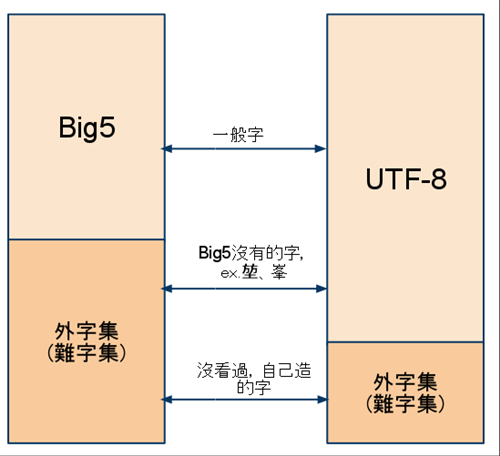
http://smallken.com/blog/wp-content/uploads/2010/06/Untitleddrawing2.png

AP Server上到底有幾個地方要設定呢?其實我試過很多地方的設定,但,我最後確定的是主要有幾個,第一個是URL Encoding, 第二個是Filter,第三個是File Encoding,第四個是JSP的開頭的部分,不過1, 3JBoss有不一同的設定方式,可以參考下面 JEAP 5&6 — 編碼設定問題 (Encoding) 、使用 CharacterEncodingFilter 解決 Java Web 的編碼問題 這二篇。不過,第三個我是沒設就是了,其它三個是一定要設定就是了。其它有的沒的設定可以拿掉看看,至於信良哥的編碼文章,因為我也沒有特別去試,我覺得還是先試這四個設定都不行了,再去看那些細部設定就好了。

最後簡單說一下遇到的坑吧: 1. url的部分中文傳到後端還是會變亂碼,我是使用encodeURIComponent這個js function來解決這個問題,不知道為何傳到後端會幫你自動解成正確的中文QQ。2. JSP檔案的編碼需要是UTF-8,其實原本檔案是Big5,但在我local是可以正常運行的,放到server就是亂碼,不過因為檔案有點多,我是用mac的iconv來轉,如果使用windows的朋友,可以用uniconv(沒用過,不掛保證XD)。3. ESAPI也需要設定編碼,如果弱掃需要使用這個資安的套件,主要在ESAPI.properties可以設定編碼Encryptor.CharacterEncoding=UTF-8和HttpUtilities.ResponseContentType=text/html; charset=UTF-8。

參考資料:

你的原始碼是什麼編碼?

UniConv - 超強轉碼工具 BIG5/GB/UTF8/Unicode

http://www.importnew.com/19791.html

JavaScript 的 encodeURIComponent() 會將字串轉換成 UTF-8 編碼 - Tsung's Blog

Big5、UTF-8、難字、外字解決方案選擇

JEAP 5&6 - 編碼設定問題 (Encoding)

使用 CharacterEncodingFilter 解決 Java Web 的編碼問題

亂碼 1/2


2015年11月11日 星期三

Java基礎-常用API(上)

為什麼要寫這篇呢?因為吃飽太閒嗎,當然不是=_=,因為人的記憶力是有限的,好啦,其實是我的記憶力是有限的 冏,有些東西真的是每天用,很自然就會記得了,比如if和for,但,有些大概一個星期用到一次,或是一陣子沒用…就很自然的忘記了,不過,有些人記憶力是真的蠻好的就是了,但,我不行,所以整理了一下,我覺得常用的Java API。

不過呢,Java是物件導向的程式語言,何謂物件導向呢…其實,這個問題可以說三天三夜,但,不是這裏的重點,重點是,相同類別的function,很可能會被記到同一個類別上,所以,常常會利用IDE的auto instance功能,來協助查詢可用的api,不過,基本上這樣也就夠了嘛,要用再查嘛,但,其實另一個重點就是速度,天下武功,唯快不破(根本在亂用XD),要當一個產值高的Progamer還是記一下常用的API吧 冏

大概列一下我覺得常用的API類型好了
型別轉換-
在強型別的世界,應該是幾乎每天都在使用吧,但,我也常常一沒寫就忘光光了 冏

日期運算-
沒那麼常用,但我敢保證,如果你有在寫程式,你這輩子一定會用到

正規化-
就我個人的經驗,不常用,有的人可能不會用到,但,我每次用都要重查,也蠻麻煩的=_=

IO處理-
這個嘛,常用到,但通常的情況是,用過一次之後,就掛在那邊了XD

2015年11月1日 星期日

TDD for Java (1)

之前去上了TDD的課,覺得收獲蠻多的
不過行銷文還是少講一點好了XD
因為課程還是以C#為主,但工作上還是以Java為主就是了
不過,基本上概念還是相通的就是了
基本上,講了很多很實用的觀念
不過,最後還是要靠自已慢慢吸收、消化和實踐就是了

基本上,我覺得會寫測試,是一個工程師的一個重要指標
代表你所產出來的程式碼的品質,是否正確和可靠
也可代表具有可維護性
當然還有其它面向的東西,可讀性、clean、彈性、效能等等
彈性和可維護性,可以從Design Pattern上學習
可靠性也和Exception Hangle相關
至於可讀性和Clean,個人覺得可以看看Clean Code...或是Effective Java之類的
至於,效能又只另外一個議題了,程式碼的寫法、系統面、設計面等等,甚至到資料結構和演算法面…

不過,第一步還是先從測試開始吧…
畢竟,在商業軟體的世界,先把東西對才是重點
先求有再求好XD
但,如果客戶要求說,我這個功能需要每秒可以處理百萬筆資料
那又是另一個議題了
畢竟,就像某些人常講的,技術不是問題
當然不是問題,問題在於口袋夠不夠深XD

至於上課說了什麼,老實說
年紀大了沒辦法記那麼多了 冏

只記得第一天是講了Unit Test
如何做到Isolate的測試,如果使用Mock和stub做到這點
和一些測試的準則
第二天,主要講了整合測試的部分,再利用整合測試做重構
然後,再進一步做Unit Test
第三天,主要講了TDD和BDD的部分
如何簡單的根據需求,轉換成test case和進行開發

So, anyway, Let's start practice in Java.
I show some resources below.

Resource:
http://www.ithome.com.tw/news/87245
http://ithelp.ithome.com.tw/question/10109845
http://blog.littlelin.info/posts/2014/04/26/tdd-is-dead-long-live-testing
http://openhome.cc/Gossip/JUnit/
http://www.vogella.com/tutorials/JUnit/article.html
http://www.dotspace.idv.tw/ArecaChen/Test/JUnit_Primer.htm
http://blog.iamzsx.me/show.html?id=118001
http://blog.csdn.net/yasi_xi/article/details/24642517
http://billben.iteye.com/blog/1872196
http://obullxl.iteye.com/blog/727304
http://www.codedata.com.tw/java/unit-test-the-way-changes-my-programming
https://blog.alphacamp.co/2015/03/02/tdd-kata/


2015年10月30日 星期五

Insert Sequence Column - Oracle

基本上在Oracle上,不像SQL Server或DB 2有Identity的功能
沒有支援Auto Increment的功能,不過,這個功能真的還蠻常用的

不過其實還有有其它的技巧可以達成這件事的,比如使用下面參考資料的Trigger,不過,我個人比較喜歡單純一點的做法,在建立Table後,再建立Sequence,而在Insert的時候再使用Sequence.NEXTVAL取值的方式

CREATE TABLE TableName  
(  
  Column1 NUMBER NOT NULL,
  Column2  VARCHAR2(11) NOT NULL,
  CONSTRAINT TableName_PKEY PRIMARY KEY(Column1)
);

CREATE SEQUENCE TableName_SEQ;

INSERT INTO TableName (Column1, Column2)
VALUES(TableName_SEQ.NEXTVAL, 'Column2Value');

參考資料:
https://oracle-base.com/articles/misc/autonumber-and-identity

2015年10月27日 星期二

Tomcat JNDI設定

之前工作主要是用Spring的方式來設定資料庫,將連線的相關資訊另外寫到參數檔中,現在因為工作需要,所以需要設定一下JNDI,之前在用JBoss的時候,大概就有用過了,只是換到Tomcat上,還是要找一下資料來設定,其實細節大概看一下,下面的參考資料就知道怎麼用了,至於要怎麼做,就看環境和需求來取捨吧。

只是想說,不管是用Spring設定,或是AP Server設定,各有優缺點,畢竟Spring的設定方式也是蠻簡單的就是了,但設定在AP Server上,可以將資料庫連線的細節交給DB,實務上也不需要分成開發環境或是線上環境的連線設定檔了,當然,其實也可以說只是把設定檔移至AP Server上就是了 冏。

 其實還有不少東西可以丟給AP Server來處理,比如log或是MQ,不過就我個人觀點,不管是用Spring或是AP Server的方式,工作loading都不會減輕丫!只是單純的將業務邏輯無關的部分從程式中抽離就是了。


參考資料:
http://fanli7.net/a/fuwuqiruanjian/Tomcat/20120701/179189.html
https://tomcat.apache.org/tomcat-7.0-doc/jndi-datasource-examples-howto.html

2015年10月26日 星期一

Package naming

package主要的目的是避免相同名稱的Class發生衝突,因此可以避免開發上麻煩
不過,基本上大部分的人都是重視類別、方法、變數上的命名,不過也是因為套件的命名
其實也蠻少會做什麼特別的變動 

基本上,我以前也是亂命名套件的名稱,比如tw.bill.xxx
但,現在覺得tw的意思不大,如果是公司的話應該用com,組織的話就org,個人的話…
有想到pri,但如果是要推個人做的產品的話,目前還沒有想到好的單字,可能就還是先用pri吧,而第二個單字,一般就是公司名,或是省略,直接接產品名
再來呢,就會區分功能區塊了,而功能區塊下,
又會根據其特性,再進行細分,基本上就是這樣啦

另外,至於interface和實作是否要分開,個人會比較覺得分開會比較好,而實作再跟據其對應的對像進行package的分類,不過,這也只是我比較常遇到的清況,
也可以根據功能進行package區分就好,然後Interface和實作可以放在一起,看那種方式最適合實際情況吧

另一個情況要思考的是,關於繼承關系的package分類,這個可以參考一下java api的分類方式,可以看以我個人最常用的ArrayList和其父介面Collection,
嗯…都放在同一個package中,或許這是一個最簡單的作法
思考過多,反而會造成使用上的困難,但這是對外公開的介面,實際上或許package內部,也隱藏著不為人知的祕密吧XD

關於溝通

其實,這篇沒什麼內容,可能比較適合po在plurk之類的
主要是想說關於溝通的一些想法
之前聽過一個說法是說,人其實對於對方說的不能百分之百完全了解
忘記是50%還是多少百分比了
只是,對某些人聽了某些問題,說我懂了
但問他,他也說不出個什麼毛來
也有的人,可以馬上嘴出一個長篇大論,但狗屁不通
有的人,明明聽的時候,明明就在睡覺,
但問他,又可以說的頭頭是道,可能比較講者說的還好…
或許,在底層有些共同的道理存在吧…
只是想說,一知半解是很可怕的一件事情
但對某些人愛面子的人來說,說不知道可能是很難的一件事吧
不過,學著試著去表達自已的想法,就算錯了,也沒關係
也比裝著自已很懂的樣子,但說不出個毛來的好…


2015年10月2日 星期五

[Mac]如何讓popup視窗的button能夠使用鍵盤操作

在mack notebook上,預設popup視窗是不能使用鍵盤做選擇
使用鍵盤可以加速操作

系統設定->鍵盤->快速鍵->啟用 全部控制選項
tab選擇 space使用


圖一、設定畫面


2015年8月4日 星期二

Maven study

Gossip
I don't like Maven indeed. Xml configuration method is more complex for now. But, my most work still need Maven. The principle is same as other dependency tools. So, let us still work on it for now.  If you don't have any constrain, you can learn Gradle which is a modern dependency tool. Otherwise, I also don't like Eclipse, but I still work on it. Intellij IDEA is also good choice, but it is not free. You think you need to improve your production of coding, then buy it. However, I still need Eclipse for my working tool, so it is not necessary to learn two IDA as same time.

The reason why I return to study Maven is Spring 4. Spring 4 use Maven to set up Spring Boot or other Spring stuff. So, I need to understand Maven in some kind of level.

Resoure
Official Maven web site on Apache

Tutorial


2015年7月9日 星期四

Create a sample project(3) - WebService Choice


The interesting thing is when I have finished studying AngularJ S, using server-client method is a good way to develop outside website. Because that we can reduce the network flow and more efficiency web app. But, SpringMVC is still a good way to develop some types website, because it can handle Session, redirect URL, and so on more easier.

So, should I choice a more efficient web service framework to handle backend server? I think the answer is YES!  Jersey is most popular Restful web service framework, and has high performance.  I have thought about using SpringMVC, but when I see this experiment. I decide change to Jersey.
https://github.com/jhipster/generator-jhipster/issues/814

The performance is bothered me for a long time. There is a solution appear called Netty. Netty is a network communication framework. It supports event-driven, asynchronise , non-blocking IO feathers.

Netty article
http://ifeve.com/netty1/

But, do we need to give up SpringMVC? Maybe yes or not, because SpringMVC is more suitable for small scale or inside website. Anyway, the last example project have add and query function. You can implement delete and update functions by your own.

Next, we should change our webservice framework to Jersey.


2015年7月6日 星期一

Front End Resorces

Angular.js And React.js are the two popular front end framework recently.
I choice the Angular be my front end backbone, may use some react components do some special job. 

This is an angular tutorial vedio
http://campus.codeschool.com/courses/shaping-up-with-angular-js/intro

Another tutorial from W3CSchool

Angular API

EggHead. An expert do some examples on Angular( and also react).

Some Chinese resources
http://blog.miniasp.com/archive.aspx#cat-AngularJS

React, not a good tutorial, but a good sample code library

The CSS is also be my weakness, so I don't want to spend time for creating CSS template.
You can use bootstrap CSS or Wix web site template


2015年7月1日 星期三

Create a sample project(2) - Setup PostgreSQL on JBoss

After finishing the Maven hell, we can finally start the fun part. I choice the PostgerSQL be our database. There are some reasons. First, it's free. Then, it is more like Oracle, such SQL syntax, design model. So, this is why I don't choice MySQL. Moreover, why  not choice RMDB instead of NoSQL. There some pros and cons. RMDB is more convenient by using SQL. But , NoSQL is more powerful on big data. Anyway, I just choice a simple for starting. After then, I will also study MongoDB.

Actually, this is a simple one to install PostgreSQL on your computer, you can choice raphic installation which conclude pgAdmin. So, you can build db and execute SQL command on pgAdmin.
http://www.postgresql.org/download/
Otherwise, I not sure homebrew wheather contain pgAdmin.

All right, after we install PostgreSQL, we should build an example database on it. So, we create a new database called TEST. Note that using capital is prefer for naming rule, it will effect the SQL command after. Then, we use JPA tool to create the schema of example table.

We use previous project for our practice,

First, setup the connection of DB.
On project -> property -> Hibernate, setup up the Postgre Driver

Second, use JPA Tool to generate
Project -> JPA Tool -> Generate xxx
In here, we change Entity to Table


Next, we should setup the JBoss db connection, or used db configuration on JBoss.
Actually, this is hard part. If I don't see the document, I will never figure it out.
Anyway, we change the DB configuration on this step. Maybe we try not to config JBoss server config file.

I have use maven to import Postgre driver, but the result is fail. I don't know why

You can see this blog to config the database connection
http://wei-meilin.blogspot.tw/2012/07/jeap-6-datasource.html

I choice the module method to setup up. Note that please use the JDBC4(not JDBC41) for setup.

There are some tips you need to know on our prototype project.

  1. Remove spring-quickstart-ds.xml
  2. Change the value of hibernate.hbm2dll.auto on persistence.xml
  3. Setup up datasource and driver on standalone.xml(or domain.xml) which is in JBoss folder(...this depend on that which you need is standalone or domain).
  4. If you change the datasource JNDI name, you should change the JNDI value of dataSource on infrastructure.xml.
  5. You also need to add dependence of PostgreSQL.


standalone.xml
<datasources>

    <datasource jndi-name="java:jboss/datasources/SpringQuickstartDS" pool-name="PostgresDS" enabled="true" use-java-context="true">

        <connection-url>jdbc:postgresql://172.0.0.1:5432/Test</connection-url>

        <driver>postgres</driver>

        <security>

            <user-name>postgres</user-name>

            <password>xxxx</password>

        </security>

    </datasource>

    <drivers>

        <driver name="postgres" module="com.postgresql">

            <xa-datasource-class>org.postgresql.Driver</xa-datasource-class>

        </driver>

    </drivers>

</datasources>


pom.xml
<dependency>

 <groupId>postgresql</groupId>

 <artifactId>postgresql</artifactId>

 <version>9.1-901.jdbc4</version>

</dependency>

Pardon me for such mess article. I avoided to write  to much detail for some reasons. Maybe I will reorganize this article one day. Finally, we create the Database connection. JPA and its annotation are such great tools to create relation with the database. But, we should not focus on that, because it so easy to use. Next time, we we will write the our backend code by using SpringMVC and its unit test. See you~


2015年6月27日 星期六

Maven Note - Basic

I have study this project manage tool, Maven, for a while. But, I still feel confused for this tool. I used Ant for my previous job. This is an easy tool to manage project. But, it does not have the dependency management. So, we still need to learn it. Actually, if you are java coder, you should learn it for its basic mech anism. Other program languages also have their own project manage tool, but this is not our main goal. So, I make a list which your should learn.

Installation
The Concept of Maven
Create a project
Know about pom.xml


Installation


How to install maven, you can google. If you use mac, you can used Homebrew is a very great package manage tool.
brew install maven


The Concept of Maven


There are some good tutorials of Maven
Chinese-
http://www.codedata.com.tw/java/understanding-gradle-2-maven/
http://juvenshun.iteye.com/blog/213959
http://takeshi-experience.blogspot.tw/2011/12/java-mvc-sample-2-with-maven.html
English-
http://www.javacodegeeks.com/?s=maven

Using a simply way to explain, there are three life cycle clean, default, site.
clean life cycle - you should clean your previous building content, before you build new one.
build life cycle - build your project, and deploy it.
site life cycle - Analyze the project data.

There are many phases defined for each life cycle. You can read this
http://maven.apache.org/guides/introduction/introduction-to-the-lifecycle.html#Lifecycle_Reference 

Each phase define its workflow and goal to execute.
goal is a maven plugin to execute the command, like compiler:compile.
compiler is the plugin name, and compile is the goal name.

You can also combine these three lifecycle, like mvn clean compile site. compile is a phase of default lifecycle.


Create a project


You can use command line to build a simple project, like

mvn archetype:generate -DgroupId=com.di.maven -DartifactId=hello-world -DarchetypeArtifactId=maven-archetype-quickstart -DinteractiveMode=false


Actually, you can also use Eclipse( or other IDE which support Maven) to build Maven Project.
There pictures are how to create a Maven project in Eclipse.


Know about pom.xml


This is a simple pom.xml file
<project xmlns="http://maven.apache.org/POM/4.0.0" xmlns:xsi="http://www.w3.org/2001/XMLSchema-instance"
  xsi:schemaLocation="http://maven.apache.org/POM/4.0.0 http://maven.apache.org/maven-v4_0_0.xsd">
  <modelVersion>4.0.0</modelVersion>
  <groupId>com.di.maven</groupId>
  <artifactId>hello-world</artifactId>
  <packaging>jar</packaging>
  <version>1.0-SNAPSHOT</version>
  <name>hello-world</name>
  <url>http://maven.apache.org</url>
  <dependencies>
    <dependency>
      <groupId>junit</groupId>
      <artifactId>junit</artifactId>
      <version>3.8.1</version>
      <scope>test</scope>
    </dependency>
  </dependencies>
</project>

Maven is a convention over configuration software design pattern.  This is why pom.xml file is so sample. We have a super pom.xml which config a lot of detail. So, we can start a sample project faster. But, it still confused for me. Actually, when you need to setup other configuration, you still need to figure out the correct way to config. This topic is still a problem for me. Anyway, let start it easier. In this pom.xml file, we only need to understand how to add the jar files which is needed for our project. You only add the dependency config to <dependencies>. It will auto download the jar files we need. This is also why we need to use Maven. Maven can solve the dependency hell in some situations. Otherwise, <scope> is mean the dependency will effect which s cenario will be used.

You also can search the dependency you need in
http://mvnrepository.com/

Further, there is an example which we had built before.
https://github.com/bpmabpma/JBossExmple/blob/master/springMvc/pom.xml

We can see a lot new Xml elements show up, such as <properties>, <dependencyManagement>,  <<build>, <plugin>, <profiles>. I think they are very important. But, in my present situation, I should build my project be my primary job. So, when I finish build the major part of coding. I should return Maven, and build the CI system based on Maven.

Moreover, if you really need to an expert of Maven. You should read this
http://maven.apache.org/guides/index.html


2015年6月23日 星期二

Create sample project(1) - Spring MVC + JBoss

Actually, this pototype is stole from somewhere...
Anyway, I think this a good way to start my work.
So, let start...

Later, maybe I will research why JBoss is a good AP Server Choice, and compare with other ap server(or http server). But, this is a huge work. I desire to build something first. Otherwise, the reasons why I prefer Spring MVC be my MVC framework. Maybe it is not the best choice, but on least it work perfect on Spring framework. Maybe I will also research MVC framework later.

Prepare

There are some stuffs, we need to download before starting development.
Eclipse Luna
JBoss EAP 6.4
Maven 3.3.3

Extra Config and Plugin

If we don't find the Maven Central,  we will need to setup the Maven repository url.
Preference->Maven->Archetypes->Add Remote Catalog...
Catalog File = http://repo.maven.apache.org/maven2/archetype-catalog.xml
Description = Maven Central

And, we can install the JBoss plugin on Eclipse(many feathers which we can use).

Import Maven Project

We can quickly import the sample project from the remote Maven repository.
This is one is our need.

Setup Server and Run

Use startup or Server Perspective


See the Result


Conclusion

I cut out a lot of details, just show the key point for my note. JBoss has its own default H2 database, so we can see some database applications. Next step, we will create our own database and JPA(implemented by Hibernate) config.

Github link

https://github.com/bpmabpma/JBossExmple


2015年6月18日 星期四

Build my own project - Blueprint

Strugling a long time, I have choose some frameworks and tools to build my own project. The majority reasons I choice are free and based on Java.

AP server - JBoss, the reason which I choice is it can easily be a distributed system. There are more advantages, but I am still learning. It is new for me.  It also have support JEE standard. Its main target is EJB support, but it also support web operation now. Otherwise, it can handle other JEE standard(I am still figuring it out now)

MVC - Spring MVC, there are the plenty of options on MVC framework to choice, such as Struct 2, Wicket, Tapestry, Play, etc.  So, why I take this one.

Front End - AngularJs or React, they are two frameworks which are very popular now. They can easy develop the code of front end. I am not farmiliar with them. But, I trust them can more efficiently develop on the front end.

ORM - Hibernate, because it is very suitable with JBoss. Mybatis is another option, but it is suitable for the old database scheme or more efficient requirement.

DB - Postgre and Mongo DB, one is RMDB, one is no-sql for the different purposes. Postgre is more like Oracle, so I chose. Mongo is more popular, so... . It has its own advantage, such as easy to use, flexible, etc. But, I have really do research on other options.

IDE - Eclipse

Project Management - Maven and Ant(if it is more convenient).

Monitor - Not know yet.

Testing Tool - Maybe TestNG or just Junit, not decide yet.

CI - Jenkins

SCM - git and github...

Hey, just a list, let start building.


2015年6月12日 星期五

The todo list of second half of 2015

I have a long time to write the my blog.
I want to change this blog target.
This blog still records my research of IT technology.
But, I will write the content by English.

I have found the new job on my career.
But, I still think the goal of my career.
Oversea, remote, contractual, and consultant are all acceptable.
Architect, free System Design, Startup are all the paths of future.
Anyway, I will take some time to think about it.
The new goal in my new company also must be thought.

The goal of my career is not an emergency issue.
Even it is changeable, but I still need to find it ASAP.
Then, I will work on it.

In the short term, I will take my time to study the architect.
Then, I will create a project on the AWS.
Practice is an easy way to implement dream.

I have some skills and tools on Backend(Java).
I not very good on the front end, but still have a certain knowledge and experience.
So, I will work on some old skill, like Java, and old tool, like Eclipse.
But, I will study the new tools which I am not familiar with.

Following are the list of my study list.
Maven - This is a project manage tool.
JBoss - This is a middleware application server. Its main target is manage EJB. It is                         work on my new job.
Angular or React - There are two modern JS framework. I will choice one( or both) to               implement the front end.
MCV - Choice a Java MVC framework? I still not sure to use java be my backend
              language. There are  some frameworks, such as Spring MVC, Jersey(Restful).
MEAN - This is new architecture for web site design. Mongo, Express, Augular,
              Node.js.
 Memcached or Redis - There are two memory cach tool.
AP Server - Tomcat, JBoss, Webphere, Nginix
DB - Mongo DB
MQ - Ative MQ
Spring 4 & Java 8 - Java new tech.
Design Pattern
Refactoring
SA - Diagram

I have some skills and tools, bellowing
Eclipse, ant, Java7, JQury(not very good), html, javascript(not good), Tomcat, Wicket, Camel, linux(basic)...

Somehow I think I do not have so much time to learn or review all stuff...
Anyway, create a easy sample project first...


2015年1月10日 星期六

[Maven]基本概念

2014一下子就過去了
轉眼間就2015了…
也一陣子沒有寫Blog了
一直想整理一下常用的framework和開發工具
不過大部分的時間都在混水摸魚
希望2015能完成這個目標丫

2015的首po
就從一個很基礎的開發工具開始
Maven


2014年11月4日 星期二

IntellijIDEA學習整理-快捷鍵

前言
最近研究了一套新的IDE Intellij IDEA
主要是根據研究的資料來整理而已,並沒有針對整個對應表進行整理
這一篇先整理一下,他一些好用的快捷鍵
先主要分成幾個部分好了
第一個部分是工具視窗的部分
第二個部分是程式瀏覽和查詢的部分
第三個部分是純文字編輯的部分
第四個部分是自動化的部分
第五個部分寫一些特殊的設計的概念
另外,還有些不知道在幹嘛的,先記著

2014年8月12日 星期二

Shell Scripts和程式執行方式

好久沒寫Blogger,因為ipad太好玩了,打混了一陣子
不過這次主要要寫在linux上遇到的問題
就是執行shell script的方式,主要是要執行一段script來export一些路徑
但是卻一直沒有成功,原來是因為執行方式錯誤造成。

shell script的執行方式主要有三種
./your_script.sh
sh your_script.sh
source your_script.sh

使用./和sh的方式都會呼叫子程序的方式來執行
而source是在當前的程序執行
所以使用source來執行script就可以解決我的問題了。

如果是希望在登入的時候,就將路徑設定好
就需要到家目錄($HOME)的 .profile 或 .bashrc 設定檔加上
要export的路徑

另一個問題是在執行程式時遇到的
寫了一隻常駐程式,在compile完之後
可以使用
./your_app
的方式來執行

但我執行完後,想要把連線關閉(我在這裏使用ssh進行連線)
其常駐程式也會跟著關閉

最直接的方式是使用at的指令(at為一次執行,cron是周期執行)
新增工作排程的方式
不過他有限定特定使用者才能使用
所以用另一個指令nohup的方式來執行會更好
執行方式
nohup your_app &

參考資料:
http://linux.vbird.org/linux_basic/0340bashshell-scripts.php
http://linux.vbird.org/linux_basic/0430cron.php#whatiscron_type
http://linux.vbird.org/linux_basic/0440processcontrol.php

2014年6月25日 星期三

GDB基本操作指令

前言

之前工作debug都是使用IDE的除錯功能,就是設中斷點,然後執行,再一直點下一步,然後觀查參數的變化和在那裏發生錯誤,當然如果對開發專案的程式和架構愈熟悉的話,大概看一下Log就知道問題在那裏了。

不過最近必須開發伺服器上的C++的程式,而我都是在本機上用Notepad++寫完之後,上傳到伺服器上,用make指令進行編譯,基本上是沒辦法本機使用IDE來進行除錯的。

這樣就不用debug了嗎?當然不…,一個簡單的方法就是加log,不過只在修改程式碼不多,或是錯誤在特殊狀況出現在使用,要不然可能會被搞到瘋掉吧,一個因難的方法就是,在server上搞出一個IDE的畫面出來,理論上應該灌上桌面程式再加上遠端程式,然後放上支援Linux的IDE(如Eclipse和CodeBlock),不過不用這個方法的理由蠻多的,需要花時間研究這些東西,然後搞了半天也不一定可行,重點是把server搞掛了,可能要去喝西北風了吧…

不過,還是有一條路線可以走,那就是使用gdb(用小寫因為指令就是小寫XD),這讓我想到了MUD的遊戲,感覺真的很古早味…,在習慣了隨時可以看到code來除錯後,真的需要一點時間來習慣,需要習慣使用最強的IDE來把自已的code顯示出來,就是your brain,中文翻成你的豬腦或是魚腦,好了廢話不多說了,下面簡單的記錄一些常用的指令。